Can Claude Code make videos? Yes, if the video is code
Yes. Claude Code can produce a finished MP4 on your machine with no video editor open. What it doesn’t do by itself is generate footage. It writes the video as code, usually React components in Remotion, runs the render, and checks still frames of its own work.
That decides what you can get from it. Product explainers, animated numbers, rebuilt app screens and cuts of footage you already have all fit. A photorealistic shot of someone walking on a beach needs a different kind of tool.
We have run this at two sizes: 55 videos for one app, and for this post, one 15-second video from an empty folder. The small test passed every check we gave it and still wasn’t ready to post. The reasons are the useful part.
What it can and can’t do
| Job | Can it? | How |
|---|---|---|
| Motion graphics, text, animated numbers | Yes | It writes React components, and Remotion renders them frame by frame. |
| Rebuilt app screens | Yes | It builds the screen as a component, ideally from your product’s real interface strings. |
| Editing footage you already have | Yes, without a timeline | Clips can be cut with ffmpeg and placed in a Remotion composition. |
| Checking how the video looks | Partly | It reads still frames as images. It doesn’t watch the motion. |
| Checking how the video sounds | Partly | It can measure loudness with ffmpeg. A person still has to listen. |
| Photorealistic footage from a prompt | Not by itself | That takes a generative video model. |
Set it up
Remotion publishes a Claude Code guide, and these are its steps. We ran them on Node 22 with Remotion 4.0.541 and Claude Code 2.1.319.
npx create-video --yes --blank my-video
cd my-video
npx remotion skills add
npm run dev
The last command starts a preview. Open a second terminal for the agent:
cd my-video
claude
The skills give the agent Remotion’s own guidance on compositions, captions and rendering. The installer also sets them up for other agents, including Codex and Cursor, so little here depends on Claude Code. It also warns you to review skills before use, because they run with full agent permissions. That is worth doing.
Give it facts, then a tight prompt
An agent asked to market something will happily invent a number. So we wrote the claims down first, in a short FACTS.md, with the numbers it could use and a list of what it must not say. We go deeper on this in the facts sheet post.
Real numbers from the first run, for one app:
- 55 reviewed videos
- 11 storytelling formats
- about 4.5 hours

Must not claim:
- Any number not listed above
- Customer counts, ratings, testimonials or view counts
- That it works with no review. A person checks the final work.
- Prices. None are announced.
Then we started a fresh session with this prompt:
Read FACTS.md. Every claim in the video must come from that file.

Build one Remotion composition: 1080x1920, 30 fps, 15 seconds. It has one
idea, told with one mechanic: a split-flap departures board that flips to
the three numbers in the facts file, then an end card with the call to
action. The hook must be readable on frame 0.

Layout rules: keep everything inside x 64 to 920 and y 200 to 1500, use the
full height of that area, and keep body text at 24 px or larger.

Then check your own work. Render stills at frames 0, 90, 225, 360 and 449
into out/stills, read each image, and fix what is wrong. Repeat until they
pass. Render the final video to out/video.mp4 with npx remotion render.
Confirm its size and length with ffprobe. Report what you fixed.
The pixel ranges are deliberate. Our first big run taught us that agents read “stay out of the bottom” as “stay near the top”. Numbers fixed that where adjectives hadn’t.
What happened
| Item | Result |
|---|---|
| Model | Claude Sonnet 5.5 |
| Time | about 3 minutes |
| Cost | $0.48 |
| Output | 1080x1920, 15.0 seconds, 537 KB |
That is one run, so treat the cost as an example, not a price. By its own report, the stills loop caught three problems. It had written its first files to the wrong folder, so the stills showed the placeholder. A label sat too close to the headline. The board was too narrow. It fixed all three.
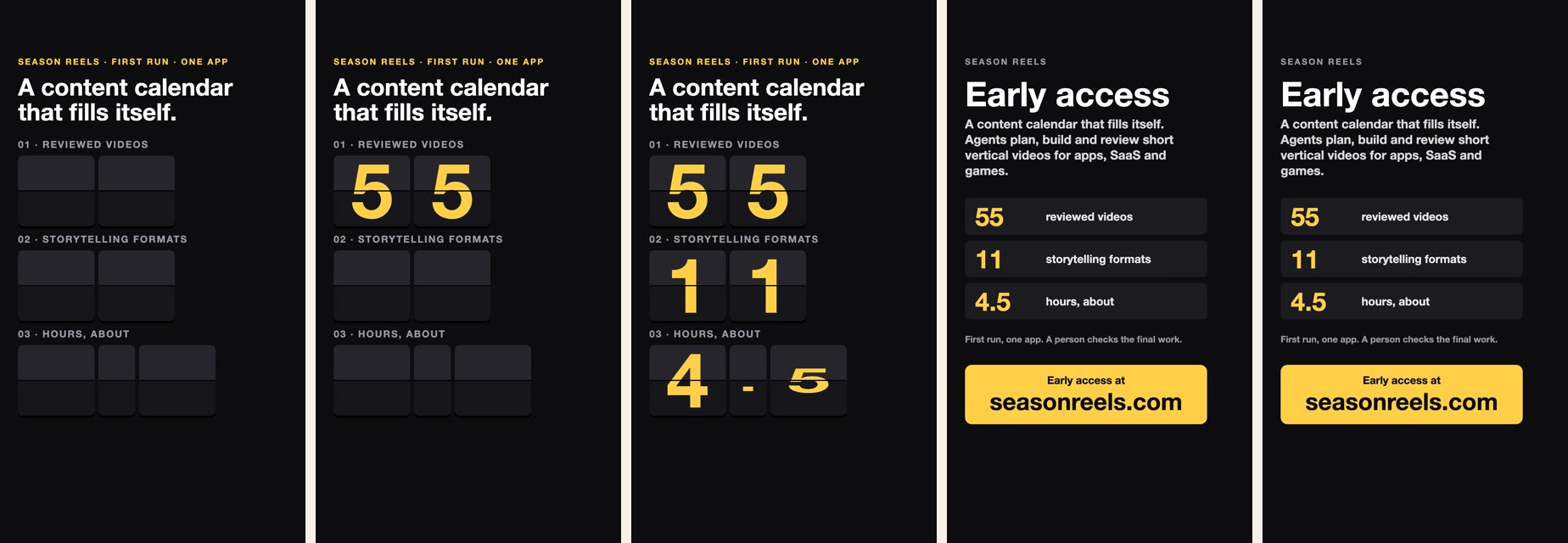
These are frames 0, 90, 225, 360 and 449, pulled from the final MP4 rather than taken from the agent’s own stills. Frame 225 catches the last digit mid-flip.
What it missed
Every claim traces to the facts file, and the video stays inside the layout limits. Then we reviewed it ourselves, and we wouldn’t post it yet.
- It is silent. The file has no audio track. Our prompt never asked for one, and the agent didn’t raise it.
- The board stops short. The widest row ends well before the right margin, and the other two end sooner. The rule set a limit, and nothing asked the agent to fill the space.
- The first frame gives no reason to stay. The tagline is readable on frame 0, so the rule passes, but it sits above three empty boards. It meets the letter of the prompt without being a hook.
- The end card just sits there. The last few seconds are a still card.
- Its report contradicted itself. It said it re-read frame 0 after its edits, then said it hadn’t. Run the check yourself rather than trusting the summary.
None of this makes the test a failure. In three minutes it produced an accurate, correctly sized draft. But it is a draft, and the gap between passing a checklist and being worth watching is where most of the work is.
From one video to a season
One good prompt gets you one video. The harder problem is the tenth video, which shouldn’t look like the first nine. On the 55-video run, a few things did most of the work:
- A shared kit. One agent built the fonts, safe zones, captions and device frames first, and finished one complete sample before anyone else started.
- Different mechanics. Each group of videos got its own way of telling, from comics to ledgers to quizzes. We explain why in the post on lanes.
- A folder per agent. Eleven agents worked in one project with no merge conflicts, because each owned its own folder.
- A second reviewer. A separate orchestrator regenerated the stills and judged them against a list. It caught layout problems the builders didn’t see as problems.
- Redo notes to the same agent. A fix took three to seven minutes because the agent still had its context. After two failed rounds, we replaced the concept.
Each lane of five videos took an agent 25 to 32 minutes and 290,000 to 390,000 tokens.
Before you post anything
- Listen to it. The agent can’t.
- Check the music license at the source. On our first run, one popular free catalog had closed and its mirror carried no license data, so every file had to be traced back by hand. An agent can find a track quickly, but it can’t make that track yours to use.
- Check Remotion’s license. It is free for individuals and teams of up to three, including commercial use. Larger companies need a paid license, so read the current terms.
- Read every claim against your facts. Do this even if the agent says it already did.
Season Reels is this workflow with a calendar around it: agents plan each day, build it on your machine and show you stills to approve, and the brand’s memory keeps mechanics from repeating. It works with any coding agent, and Claude Code is the first one we run. If you would rather try the bare version first, the commands above are all you need.